

Leave management without the HR department
The leave tracker teams actually enjoy using.
Request time off, approve in a tap, and always know who’s away. Leavefly runs the whole leave lifecycle — balances, calendar, approvals and reports — on its own, or wired into Slack, ClickUp and your calendar.
Sign up with Google or email — running in under a minute.

Works on its own — even better with the tools your team already uses.
The problem
Same week, three tools — and none of them agree.
Ask who's off next week and you'll get a different answer from each one.
says Marcus is off
says Mei is off
says nobody is off
The solution
One calm place for all of your team’s time off.
See exactly how requesting, approving and planning leave works in Leavefly — no spreadsheet required.
Team calendar
See who’s off — and who’s stretched thin — at a glance.
A shared calendar that shows real coverage, not just dates. Leavefly flags overlaps and all-hands days before you approve, so you’re never surprised.
- Multi-day and half-day leave, weekends and holidays all rendered correctly.
- Filter by team, leave type or approval status.
- Coverage warnings before too many teammates overlap.
- All-hands alerts surface as you apply — a nudge, never a hard block.

Apply & approve
Request in seconds. Approve in a single tap.
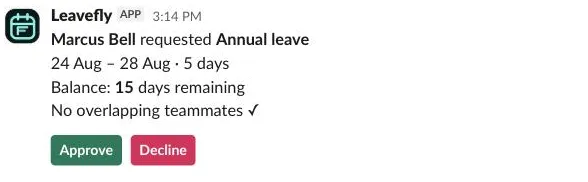
The same apply drawer everywhere — the app, a deep link, or Slack. Approvers get the dates, the balance and who else is off, then decide in one tap.
- Apply from the app, a calendar link, or a Slack slash command.
- One click to approve, with an 8-second Undo if you reconsider.
- Book on behalf of a teammate, clearly labelled.
- Decline with counter-proposed dates the requester can re-apply in one click.

Reports & analytics
Close the books without rebuilding a spreadsheet.
See how leave is actually used across the team — by type, over time, and by person — with balances that include carry-over. Export anything to CSV.
- Leave by type, trends over time, and top requesters.
- Balance report with carry-over and remaining days per person.
- Spot underused balances and capacity heatmaps.
- Export any report — or any single chart — to CSV.

And plenty more
Everything time-off, in one place that stays correct.
Balances that compute themselves
Entitlement, used, pending and remaining — calculated live from real requests, half-days and carry-over included.
Compensatory off
A lifetime comp-off ledger for weekends and holidays worked. Members claim, managers grant, spending is balance-checked.
Delegated & out-of-office approvals
Heading away? Route your approvals to a delegate for the window, automatically.
Counter-proposals
Decline with better dates; the requester re-applies in one click. No lost context.
Roles, teams & permissions
Admin, manager or employee. Optional teams. Visibility scoped to who should see what.
Audit trail
Every state change — apply, approve, cancel, undo — logged with who, when and why.
Notifications & preferences
Email and in-app across the lifecycle, with per-event, per-channel preferences for each person.
Per-org theming & dark mode
Set your brand colour (accessibility-checked) and let everyone choose light, dark or system.
Configurable to your policy
Leave types, working week, holidays, carry-over and auto-approval rules — all yours.
Migrate in minutes
Bring your team over from Pause, Timetastic or a CSV — balances and history included.
Book on behalf
Admins and managers can file leave for someone else, clearly labelled and auto-approved.
Calendar sync
Subscribe once to see approved leave in Google, Outlook or Apple Calendar — personal, team or all.
Integrations
It lives where your team already works.
Connect what you use and skip what you don’t. Leavefly is a complete app on its own — the integrations just save your team a context switch.
Slack
Request, approve and announce leave without leaving the chat.
- The /leavefly command opens an apply modal in any channel.
- One-tap approve from DM cards, with an optional reason.
- App Home shows your pending queue and balances.
- Auto-set an “On leave” Slack status while you’re away.
ClickUp
Leave lives next to the work — and stays in sync both ways.
- Every request opens as a task assigned to the approver.
- Change the status in ClickUp to approve or decline.
- Decisions made in Leavefly sync back to the task.
- Announce approved leave in a chosen channel.
Your calendar
Approved leave appears automatically in the calendar your team already checks.
- One-click subscribe via signed ICS feeds.
- Personal, team or whole-organisation scopes.
- Re-syncs automatically as leave changes.
- Unique signed links, one per member.
How it works
From spreadsheet to sorted in an afternoon.
Create your workspace
Name it, pick your brand colour, set the working week. No IT project.
Bring your team in
Invite by email, or import a CSV with everyone’s balances carried over.
Connect your tools
Slack, ClickUp or your calendar — or skip it all and use the app.
Request & approve
People file leave; approvers decide in a tap. Balances and calendar update themselves.
Growing past a sheet
A spreadsheet works for five people. It breaks at fifteen.
Past a handful of people, the cracks show. Here’s where a sheet gives up — and Leavefly just keeps working.
| Where the sheet breaks | Spreadsheet | Leavefly |
|---|---|---|
| Balance math (half-days, carry-over) | Manual formulas, easy to break | Calculated live, always right |
| Comp-off owed for worked holidays | Forgotten or disputed | A tracked, lifetime ledger |
| Approvals when the approver is away | Requests pile up behind them | Auto-routes to a delegate |
| Moving from another tool | Re-enter everything by hand | CSV import, balances kept |
| Who decided what, and when | Buried in chat history | A full audit trail |
| Team-wide visibility | One person’s file | A shared, live calendar |
FAQ
Honest answers to the obvious objections.
We already use a spreadsheet — why switch?
We don't live in Slack — will this still work?
Switching tools means re-entering everyone's balances, right?
Can we configure it to our own policy?
Is this just another app nobody opens?
What happens when the trial ends?
Is our data safe — and can we get it back out?
Is there a free plan?
How much does it cost?
Pricing
One plan. Everything included. No surprises.
or $20 / member / year
- The full web app, Slack, ClickUp & calendar sync
- Comp-off, delegated approvals & reports
- CSV migration with balance history
- Billed only for active members — archive someone and they stop counting
No card on file, so you’re never charged automatically — subscribe only if it’s a fit. Cancel anytime.
Get your team’s time off out of the spreadsheet this week.
Create your workspace, invite your team, and run your next leave request the easy way. Free for 14 days — no card, no auto-charge, set up in an afternoon.
Start free — no card needed